
If you’ve ever heard someone talk about SEO, chances are you’ve heard the term “internal linking.” But what does it mean? And why should you care, especially if you’re starting?
In this guide, you’ll learn what internal linking is, why it matters, and how to boost your website’s visibility on Google.
What Are Internal Links?
Internal links (Internal linking) are links that connect one page of your website to another page on the same website.
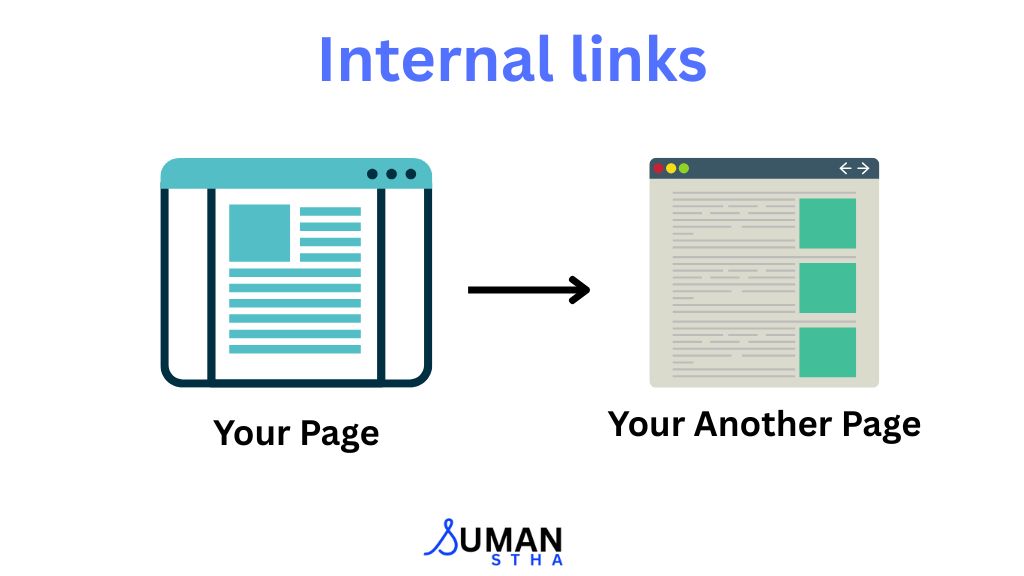
For example, if I’m writing a blog about Internal Linking and I link to another post about the On-Page SEO Guide, that’s an internal link.
It might look like this:
Learn On-Page SEO For Beginners: A Step-By-Step Guide.
These links help users explore your site and also help search engines understand your content better. Simple, right?
Why Are Internal Links Important for SEO?
Internal links may not look like a big deal, but they’re powerful. Here’s what they do:
1. Help Google Understand Your Site
Search engines use internal links to crawl your site. If your pages are linked together, it’s easier for Google to find and index them.
2. Pass Authority Between Pages
When one page has authority (or ranking power), linking it to another page on your site can help share that power, helping your other pages rank better.
3. Improve User Experience
Internal links help visitors explore related content, stay on your site longer, and find the information they need, which search engines reward.
How to Use Internal Linking Effectively (Step-by-Step)
Let’s go deeper into how beginners can use internal links the right way to improve their site’s SEO. These steps are practical and easy to follow.
1. Identify the Most Important Pages on Your Website
Before you start linking pages together, you need to know which ones are the most valuable.
Ask yourself:
- Which pages or posts are generating the most traffic?
- Which pages are converting visitors (like service pages or lead capture forms)?
- Which pages represent your main topics?
These are the pages you want to give more visibility to by linking to them from other parts of your site.
Example:
If your blog post on “On-Page SEO for Beginners” is a key page, try linking to it from multiple relevant articles, like image optimization, title tag guides, and meta descriptions.
Tip: These important pages are often called your pillar content or cornerstone content.
2. Use Descriptive, Natural-Sounding Anchor Text
Anchor text is the clickable text of a link. Instead of writing “click here,” write something that clearly explains what the reader will find after clicking.
Good example:
Learn more about creating SEO-friendly title tags and meta descriptions.
Why it works:
- It tells Google what the linked page is about.
- It sets the right expectation for the reader.
- It feels natural in the sentence.
Avoid using the same anchor text to link to different pages. Each link should be unique and contextually relevant.
3. Link Older Posts to Newer Ones (And Vice Versa)
Most people only think about linking from new content to older posts. But you should also do the reverse.
Every time you publish a new blog post:
- Go back to older blog posts related to the same topic.
- Find places where it makes sense to mention the new post.
- Add internal links naturally within the content.
This will help Google discover new pages faster and give them more authority.
Example:
If you wrote an article on “14 On-Page SEO Ranking Factors” and later wrote one on “Internal Linking Strategies,” go back to the older post and link it to the new one where it makes sense.
4. Keep Your Links Relevant and Helpful
Don’t link to random posts just for the sake of adding links. Internal links should support the reader’s journey by helping them find more in-depth or related content.
Ask yourself:
- Is this link truly useful for someone reading this page?
- Does it help them understand the topic better or solve a related problem?
Example:
If you’re writing about “Image Optimization for SEO,” linking to a post about “Website Speed Optimization” makes sense, because optimized images improve page speed.
But linking to a post about “Social Media Ads” might not be helpful in this context.
5. Don’t Overdo It — Focus on Quality
While internal links are useful, too many of them can clutter the page and confuse readers.
Here’s a rough guide:
- For short posts (under 1,000 words), add 2–4 internal links.
- For longer posts (1,500+ words), 5–10 well-placed links are enough.
Make sure every link has a purpose. If it doesn’t add value, it probably shouldn’t be there.
Google favors natural link placement over forced or spammy linking.
6. Maintain a Clear and Logical Site Structure
Think of your website like a library. The homepage is the entrance. Then you have different shelves (categories), and under each shelf are the books (articles).
Your internal links should reflect this structure:
- Link category pages to blog posts.
- Link blog posts back to categories.
- Use breadcrumbs or navigation menus to help users move between levels.
Example Structure:
- Home → SEO Category Page → “On-Page SEO for Beginners” → “SEO Titles & Meta Descriptions”
This helps Google understand the relationship between your pages, and it also makes your site easier to navigate for visitors.
7. Use Internal Links to Guide Readers Toward Action
Internal links can also help move visitors toward your business goals. If your goal is to get them to book a consultation or check out your services, add links that lead them there.
Example:
If you want to improve your website but don’t know where to start, book a free consultation and get expert advice.
This type of internal linking helps with SEO and improves your site’s conversion rate.
8. Use a Consistent Strategy for Every New Article
Make internal linking part of your content creation workflow. Every time you publish a new post:
- Link to at least 2–3 older, relevant posts.
- Go back to at least 1–2 older posts and add a link to the new post.
- Use clear, keyword-relevant anchor text.
- Make sure links open in the same tab (unless linking externally).
If you do this consistently, you’ll build a strong internal network over time, and that helps both SEO and user experience.
This not only helps with internal linking but also encourages visitors to stay longer on your site.
Common Internal Linking Mistakes to Avoid
Here are some things to avoid when doing internal linking:
- Using the same anchor text to link to different pages
- Linking just for the sake of it (without any real context)
- Stuffing too many links in one paragraph
- Forgetting to update links when URLs change or pages get deleted
Keep your links natural, useful, and up to date.
Learn More about:
Final Thoughts
If you’re serious about improving your SEO, without spending a lot of money or time, internal linking is one of the smartest places to start.
It helps Google understand your site.
It helps users find more of your content.
And it helps your other pages rank higher in search results.
Start simple. Go back to a few old blog posts and add links to your newer ones. Or do the reverse. Over time, these small improvements can lead to stronger rankings and more traffic.
FAQs
Here are 5 common FAQs related to Internal Linking:
1. What is an example of an internal link?
Answer:
An internal link is a hyperlink that points to another page on the same website.
Example:
If you’re writing a blog post about “Links” and you mention “External Links,” you could link that phrase to another post like this:
Learn about External Links, which is very crucial for SEO.
This is an internal link because it connects one page of your website to another related page on the same site.
2. Is internal linking good for SEO?
Answer:
Yes, internal linking is very good for SEO. It helps search engines understand the structure and hierarchy of your website, distributes authority (link juice) across your pages, and improves user experience by guiding visitors to more relevant content.
When used correctly, internal linking can boost the rankings and visibility of your most important pages.
3. How many internal links should I add to a page?
Answer:
There’s no fixed number, but a good rule is to link to 3–5 relevant pages where it makes sense. Make sure each link adds value to the reader and fits naturally within the content.
4. What kind of anchor text should I use for internal links?
Answer:
Use descriptive and relevant anchor text — usually the keywords or phrases related to the page you’re linking to. Avoid using generic text like “click here.”
5. Can internal linking improve page rankings?
Answer:
Yes. Internal links help search engines discover and index important pages. If used properly, they can boost the rankings of your target (or money) pages by sharing authority from stronger pages.