
Technical SEO · WordPress · Shopify · Custom CMS
Technical SEO Expert in Nepal
I find and fix the hidden problems that stop Google from crawling, indexing and ranking your website, from slow pages and broken redirects to failed migrations and hacked sites.
Client result
Sports news website, USA
51.7K
Google impressions in 28 days, starting from zero visibility
Crawling, indexing, sitemap and robots.txt fixes were a key part of this result. I also guided the client’s developer through the Core Web Vitals fixes.
- Screaming Frog and Search Console audits
- WordPress, Shopify and custom CMS
- Fix lists your developer can follow
- Flexible contract terms
What is technical SEO?
Technical SEO makes sure search engines can crawl, render, index and understand your website, and that it loads fast on every device.
It covers the parts of SEO visitors rarely see: site structure, sitemaps, robots.txt, redirects, page speed, structured data and how your pages are built.
Why it matters
Great content can’t rank if Google can’t reach it. A single robots.txt mistake can hide a whole website, and one badly planned migration can wipe out years of rankings in a week.
Technical SEO removes those blockers, so your content and links can do their job.
Signs your website has technical SEO problems
If you recognise any of these, something under the hood is holding your rankings back.
- Important pages are missing from Google
- Traffic dropped after a redesign, a new host or a new domain
- Search Console shows hundreds of 404 errors or excluded pages
- Core Web Vitals are failing, or your site is slow on mobile
- Several pages compete for the same keyword
- Images or links broke after a migration
- A site: search shows pages you never created
What I fix as your technical SEO expert
Twelve areas I audit on every website, fixed in order of impact.
Crawling
Crawl errors, blocked pages and crawl budget wasted on pages that don't matter.
Indexing
Pages excluded from Google, wrong noindex tags and 'Crawled, not indexed' issues.
Core Web Vitals and speed
LCP, INP and CLS, image weight, caching and render-blocking files.
Schema markup
Missing or broken structured data for your business, services, products and FAQs.
XML sitemaps
Missing sitemaps, outdated URLs and sitemaps full of redirects or 404s.
robots.txt
Rules that accidentally block important pages, or let bots waste time on junk URLs.
Redirects
Redirect chains, loops and temporary redirects that should be permanent.
404 errors and broken links
Dead pages, broken internal links and broken images, fixed or redirected.
Duplicate content and cannibalisation
Canonical tags, duplicate URLs and several pages competing for one keyword.
Mobile usability
Layout, text size and tap-target problems on phones.
JavaScript rendering
Content and links Google can't see because they only load with JavaScript.
Hreflang
Missing or wrong language and country tags on multi-country websites.
Working with your developer: I fix what I can myself. When a fix needs a developer, I write a clear, prioritised fix list and guide them through it until it’s done.
Website migrations without losing rankings
Many trek and travel companies in Nepal move from WordPress to a custom CMS, switch hosting or change domains without a migration plan. The result is the same every time: hundreds of old URLs return 404, images break, and rankings that took years to build disappear.
Fixing a migration that already went wrong
- Crawl the new site and pull the old URLs from Search Console and backlinks
- Map every old URL to its closest new page
- Add permanent 301 redirects, and let truly dead pages return 404 or 410
- Fix broken images and internal links
- Resubmit sitemaps and watch the Pages report until it settles
Planning a migration before it happens
If you’re about to redesign or move your website, I build the URL map and redirect plan first, so launch day doesn’t cost you traffic.
Real example
Trek and travel website, thousands of pages
After a migration, I found and fixed 30 to 40 broken URLs, mostly expired trip departure pages. Each one now redirects to its main trek package. I also cleaned up crawl budget, so Google spends its visits on pages that matter.
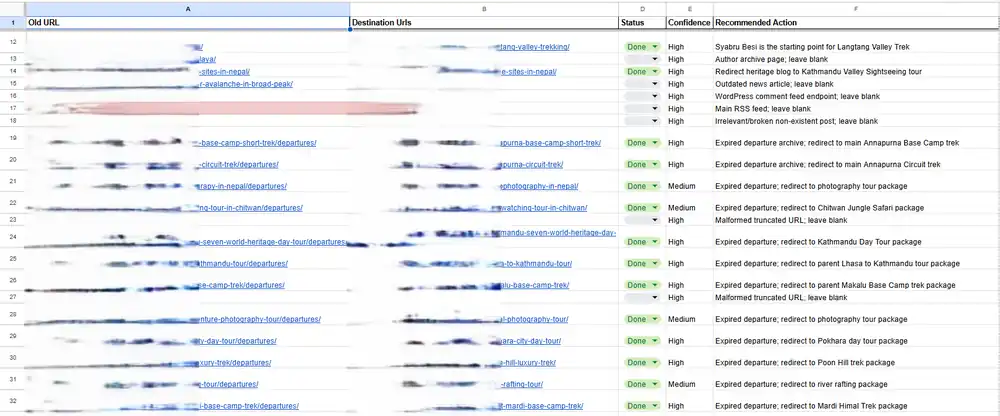
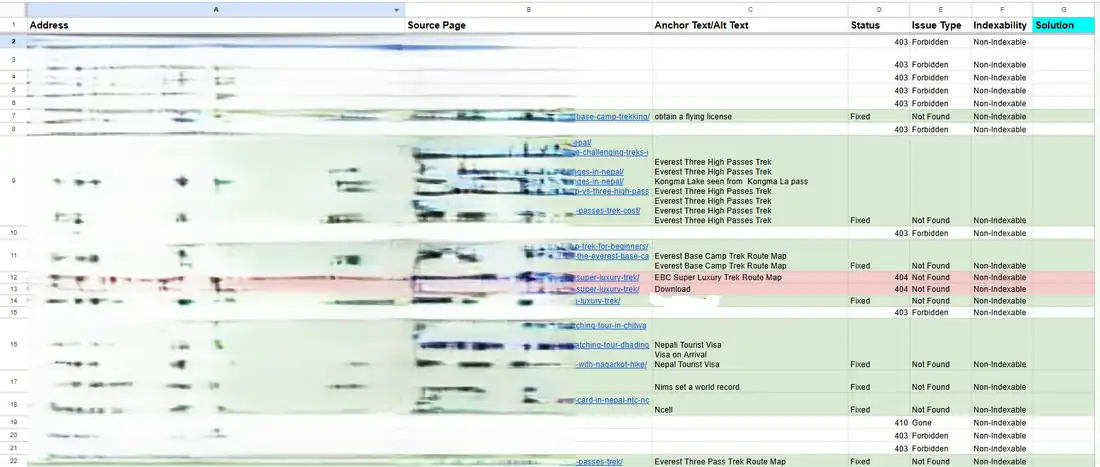
Client URLs blurred for privacy. Swipe, scroll or use the arrows.
Hacked website recovery
A long-established clinic website with three branches was hacked. Spam code went in through the contact page and spread across the whole site. The logo was replaced, and a site: search showed hundreds of spam pages listed under the clinic’s own domain.
What I did
- Took the infected page offline as a draft while searching for the injected code
- When the malware started deleting site files, restored the full website from the cPanel backup, working with the hosting provider’s support team
- Set a new strong password and changed the WordPress login URL
- Removed plugins the site didn’t need
- Installed a security plugin (AIOS) to harden the site
The site was clean and secured within 3 to 4 days.

Warning signs to watch for
- Pages you never created appear in a site: search
- Your logo or content changes without anyone on your team touching it
- Google shows strange titles or a security warning for your site
Proven results
Technical SEO results
Real projects where fixing technical problems opened the door to growth. Technical fixes were one part of each project, alongside on-page and content work.
News · USA
Sports news website
51.7K
impressions in 28 days, from zero Google visibility
Technical issues fixed: crawling, indexing, XML sitemap, robots.txt and Core Web Vitals (with the client’s developer)
Manufacturing · USA
Industrial filtration manufacturer
507K
impressions in 90 days, with +10.6% organic clicks
Technical issues fixed: 404 errors, duplicate pages and keyword cannibalisation across thousands of pages
Software
AI software company
1,922
organic clicks in 6 months, from 59K impressions
Technical issues fixed: 404 errors, crawling and indexing issues
How I work
01
Crawl and audit
A full crawl with Screaming Frog plus Search Console’s Pages, Crawl stats and Core Web Vitals reports.
02
Prioritise by impact
Every issue ranked by how much traffic it’s costing you, so the biggest blockers go first.
03
Fix or brief your developer
I fix what I can directly, and give your developer a clear fix list for the rest.
04
Verify in Search Console
Each fix is validated in Search Console, so we know Google has seen it.
05
Monitor
Websites keep changing, so I keep checking for new errors every month.
What you get
- A technical SEO audit report in a Google Doc (or a Google Sheet if you prefer)
- A prioritised fix list your team or developer can work through
- Fixes done directly where I have access
- A monthly report at the end of each month
Is technical SEO a one-time job?
No. Websites keep changing, so new 404s, indexing drops and speed problems keep appearing.
While we’re actively fixing a site with many issues, I check it two to three times a week. After that, I monitor it every month so small problems never grow into traffic losses.
Tools I use
- Screaming Frog SEO Spider
- Google Search Console
- PageSpeed Insights
- Ahrefs
- Semrush
- Google Analytics 4
Platforms I work with
WordPress
Plugin bloat, slow themes, duplicate archive pages and security.
Shopify
Duplicate collection URLs, app scripts slowing pages, and structured data.
Custom CMS
Rendering, redirects, sitemaps and migrations built from scratch.
Why technical SEO alone isn't enough
Technical SEO removes the blockers, but rankings also need clear, well-optimised pages (on-page SEO), useful content (SEO content writing), authority from other websites (off-page SEO), and for local businesses, a strong Google Business Profile (local SEO).
Technical SEO pricing
Technical SEO is priced on your website’s size and how many issues it has. Send me your website and I’ll quote after a free check. Contract terms are flexible.
Technical SEO questions, answered
What does a technical SEO expert do?
A technical SEO expert makes sure search engines can crawl, render and index your website. That includes fixing crawl and indexing errors, Core Web Vitals and speed, sitemaps, robots.txt, redirects, 404 errors, duplicate content, schema, mobile issues, JavaScript rendering and hreflang.
How much does a technical SEO audit cost in Nepal?
It depends on your website’s size and how many issues it has. I give you a quote after a free check of your website.
Can you fix my website after a bad migration?
Yes. I map your old URLs to the new pages, add 301 redirects, fix broken images and links, and resubmit your sitemaps. On one trek and travel website, I found and fixed 30 to 40 broken URLs left behind by a migration.
My website was hacked. Can you help?
Yes. I’ve recovered a hacked clinic website by restoring it from a clean backup and then hardening it with a new password, a new login URL, fewer plugins and a security plugin. The recovery took 3 to 4 days.
Do you need access to my hosting or cPanel?
Not always. I can audit any website from the outside, but access to WordPress, Search Console and sometimes hosting lets me fix issues directly instead of only listing them.
Will technical SEO alone improve my rankings?
It removes the problems that hold your rankings back. Most websites also need on-page SEO, content and authority building to reach the top results.
Do you work with my developer?
Yes. When a fix needs code changes, I write a clear fix list and guide your developer through it. On a US sports news website, I worked this way with the client’s developer to fix Core Web Vitals.
Free website health check
Is something broken on your website?
Send me your website. I’ll check its crawling, indexing and speed, and tell you what’s holding it back. No obligation.