
When starting a website or blog, many beginners focus on content, design, and keywords, but they often forget one important thing: the SEO friendly URL structure. A clean, well-organized URL helps both users and search engines understand what your page is about.
In this beginner’s guide, you’ll learn how to create SEO-friendly URLs, why they are important, and how to avoid common mistakes. Let’s make your URLs simple, smart, and search engine–ready.
What Are SEO-Friendly URLs?
A SEO friendly URL is short, readable, and includes your main keyword. It gives both search engines and users a clear idea of what your page is about, even before they click.
Example:
- Bad URL: https://sumanstha.com/page?id=1234
- Good URL: https://sumanstha.com/internal-linking-for-seo-guide/
Why is it important?
- Helps Google understand the content of the page
- Increases click-through rate (CTR)
- Builds trust with users
- Improves site structure and internal linking
Parts of a URL: Understanding the Basics
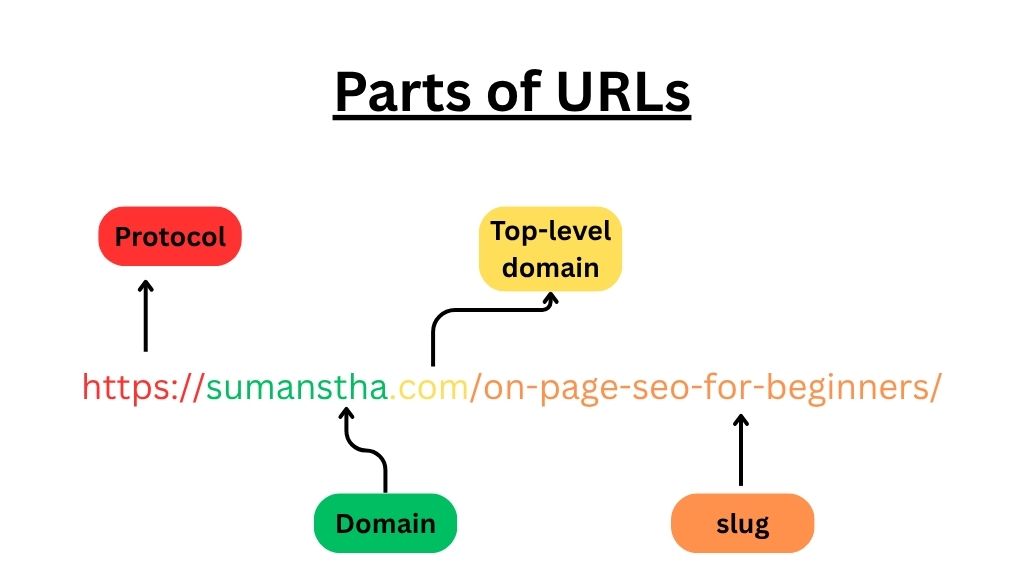
Here’s a simple breakdown of what makes a best URL:
https://sumanstha.com/on-page seo beginners/
- Protocol: https – secure and trusted
- Domain: sumanstha – my website
- Slug: /on-page seo for beginners – the part I can control SEO.
This slug is the main part you’ll optimize for SEO.
Best Practices for an SEO-Friendly URL Structure
Your website’s URL might seem like a small detail, but it plays a big role in SEO and user experience. A clean, clear URL helps search engines and people understand what a page is about, which means better rankings and more clicks.
Let’s walk through some simple (but powerful) tips to make your URLs more effective:
1. Keep It Short and Simple
Long URLs often look confusing and are hard to remember. When a link is shared on social media or pasted in an email, long URLs are more likely to break or be ignored.
Instead, use a few meaningful words that directly describe the page.
Bad Example:
https://sumanstha.com/everything-you-need-to-know-about-14-on-page-seo-ranking-factors-in-2025/
Better Example:
https://sumanstha.com/14-on-page-seo-ranking-factors
Why it works:
Short URLs are easier for users to read and for search engines to crawl. They also look cleaner in search results and help build trust.
2. Use Your Main Keyword in the URL
Including your target keyword in the URL helps Google understand what the page is about. It also increases your chances of ranking when someone searches for that keyword.
Example:
If your blog is about free SEO tools, a good URL would be:
https://backlinko.com/best-free-seo-tools/
Pro tip:
Don’t try to stuff extra keywords into the URL. Use just the main one and keep the wording natural.
3. Use Hyphens to Separate Words (Not Underscores)
Google recommends using hyphens (–) instead of underscores (_) to separate words in a URL. Why? Because search engines treat hyphens as word separators, underscores are not.
Correct:
https://sumanstha.com/internal-linking-for-seo-guide/
Incorrect:
https://sumanstha.com/internal_linking_for_seo_guide/
Hyphens make the URL easier to read for humans and search engines. They clearly define each word and improve clarity.
4. Always Use Lowercase Letters
URLs are case-sensitive. That means https://sumanstha.com/track-seo-performance/ and https://sumanstha.com/Track-SEO-Performance are seen as two different pages by search engines. This can cause SEO issues like duplicate content.
Best practice:
Stick to lowercase letters throughout your URLs to avoid confusion and maintain consistency across your site.
5. Remove Unnecessary Words and Symbols
Words like “the,” “a,” “of,” “and,” or random symbols like ?, &, and = don’t help with SEO — they just make the URL longer and harder to read.
Instead of:
https://ahrefs.com/blog/how-to-do-a-keyword-research/
Use:
https://ahrefs.com/blog/keyword-research/
Why it helps:
Cleaner URLs improve both readability and crawlability. Google and users prefer straight-to-the-point structures.
6. Avoid Dates and Numbers (Unless Necessary)
Adding dates or version numbers (like 2024 or v2) can make your URL look outdated over time, especially if the content remains relevant long after that date.
Better URL:
yourwebsite.com/seo-trends
Instead of:
yourwebsite.com/seo-trends-2024
When to include dates:
Only add the year if the page is specifically about trends for that time, and you plan to update it regularly.
7. Keep a Logical and Clean Site Structure
Think of your website as a well-organized folder. Use categories and subfolders to group similar pages, but don’t go overboard with too many layers.
Good example:
yourwebsite.com/seo/on-page-seo
yourwebsite.com/seo/technical-seo
This shows search engines (and users) that your content is part of a structured SEO category.
Avoid this:
yourwebsite.com/seo/on-page/guide/2025/full-version
Why? Deep, complicated URL structures are harder to manage and can confuse users and Google. Stick to a 2 or 3-level structure at most.
Common URL Structure Mistakes to Avoid
- Stuffing keywords like SEO-URL-STRUCTURE-SEO-SEO-Guide
- Changing URLs after publishing without setting up a redirect
- Using dates unless your content is time-specific (/2022/seo-guide gets outdated fast)
How URL Structure Supports Site Hierarchy
Think of your URLs as your site’s map. A clean structure helps:
- Organize content by topic
- Improve internal linking
- Make it easier for Google to crawl your site
Example:
example.com/seo/on-page-seo
example.com/seo/url-structure
example.com/seo/internal-linking
This tells Google that all pages belong to the SEO category.
SEO Friendly URL Structure Examples
Here are some quick examples to follow:
| Page Topic | Good URL Example |
| On-Page SEO | example.com/on-page-seo |
| SEO Titles & Meta | example.com/seo-titles-meta-descriptions |
| URL Structure | example.com/seo-friendly-url-structure |
Conclusion
Your URL structure for SEO might seem small, but it plays a big role in how search engines and users see your content. Clean URLs improve rankings, user experience, and click-through rates.
Remember these key tips:
- Keep it short and relevant
- Use keywords
- Avoid unnecessary words or characters
FAQs
Here are the 5 most important FAQs;
1. What is an example of a good SEO-friendly URL?
Answer:
A good SEO-friendly URL is short, easy to read, and includes keywords.
Example:
yourwebsite.com/seo-friendly-url-tips
It tells users and search engines what the page is about.
2. How do you write an SEO-friendly URL structure?
Answer:
To write an SEO-friendly URL:
- Use simple and relevant keywords
- Avoid special characters and numbers
- Use hyphens (-) instead of underscores (_)
- Keep it short and meaningful
- Use lowercase letters only
3. Which type of URL is best for SEO?
Answer:
URLs that are short, keyword-rich, and easy to understand are best for SEO.
For example, it yourwebsite.com/seo-tips is better than yourwebsite.com/page?id=123.
4. How can I check if a URL is SEO-friendly?
Answer:
You can check a URL by asking:
- Does it include keywords?
- Is it short and easy to read?
- Does it use hyphens?
- Is it free of numbers and symbols?
Tools like Ahrefs, Yoast SEO, or Google Search Console can also help check URL health.
5. Does URL length affect SEO performance?
Answer:
Yes, shorter URLs usually perform better.
They are easier to read, share, and understand.
Long, confusing URLs may hurt user experience and SEO.